Oliko tästä vastauksesta apua? Kyllä Ei
Send feedbackPahoittelut, että emme voineet auttaa. Anna palautetta, jotta voimme parantaa tätä artikkelia.
Kirjaudu sisään DigitalBookeriin
Järjestelmään kirjautuminen Visma Connectilla
Onko jo sisään tulleet varaukset syötettävä varausjärjestelmään ennen järjestelmän käyttöönottoa?
Käyttöoikeuksien määritteleminen DigitalBookerissa
Haluan että työntekijä näkee vain kalenterin varaukset
Mitä varaustyyppiä minun tulisi käyttää?
Miksi palveluni / tuntini / kurssini ei näy varauskalenterissa?
Asiakkaan nimi varausikkunaan ennen työntekijän nimeä
Väärä puhelinnumero tai sähköposti varauksissa ja asiakaspuolella
Varauksen tekeminen ilman asiakastiliä
Asiakkaiden varausten määrän rajoittaminen
Drag&drop - mitä se tarkoittaa?
Kauanko varaukset säilyvät DigitalBookerissa?
Raporttien luominen DigitalBookerissa
DigitalBooker & DAC7-direktiivi -webinaari
Raportoivan alustaoperaattorin tiedonantovelvollisuus eli DAC7-direktiivi
Miten muutan laskutusosoitteeni?
Haluan lähettää palautetta ja kysymyksiä järjestelmästä
iCal synkronointi kalenterisovelluksen kanssa
DigitalBooker kalenterin liittäminen iPhonen omaan kalenteriin
Kaikkien työntekijöiden näyttäminen yhdessä näkymässä
Useamman toimipisteen kalenterien näkeminen
Miksi kaikki varaukset näkyvät moninkertaisena?
Haluan siirtää asiakkaan varausta. Miten toimin? Meneekö asiakkaalle vahvistusviesti siirrosta?
Voiko kalenteriin määritellä tietyn kalenterinäkymän oletusasetukseksi?
Esto varauksien tekemiselle tiettynä ajankohtana
Mitä tarkoittaa keltainen kolmio varausikkunassa?
Voinko asettaa työntekijän tekemään eri palveluita eri päivinä?
Miten määrittelen koska palveluja aukeaa varattavaksi?
Minulla on palveluita, joiden varausta en salli verkon kautta. Kuinka estän tämän?
Mikä on palvelu ja mikä on lisäpalvelu?
Palveluiden vaihtoehdot/monivalinnat
Kuinka liitän palveluun kuvauksen ja miten kuvaus näkyy?
Mitä palveluvarauksessa tarkoittaa ylimääräinen aika alussa/lopussa?
Prepaid-kortin myynti manuaalisesti
Kuinka vähennän käyttökerran prepaid-kortilta?
Työntekijä ei saa myytyä prepaidia kalenterissa
Kuinka vähennän no show -varauksen prepaid-kortilta?
En saa vähennettyä asiakkaan käyntiä prepaid-kortilta, kuinka toimin?
Veloittaako järjestelmä automaattisesti käyntikerran asiakkaan prepaid-kortilta?
Työntekijän työaikojen määrittäminen
Palveluille ei näy vapaita aikoja julkijärjestelmässä. Kuinka toimin?
Miten liitän kuvan työntekijälle?
Voiko eri työntekijöillä olla eri palveluita?
Kuinka tallennan samat palvelut kaikille työntekijöillemme?
Hallintapuolelta on kadonnut työntekijän kalenteri varauksineen. Kuinka toimin?
Poistin vahingossa työntekijän. Kuinka toimin?
Käyttäjillä on päällekkäisiä käyttäjätilejä
Pitääkö uudelle työntekijälle luoda ensin käyttäjätili ja lisätä hänet vasta sitten työntekijäksi?
Tarvitseeko työntekijä työajat?
Järjestelmässäni on päällekkäisiä tilejä. Mistä tiedän mikä tili on linkitetty työntekijääni?
Kuinka määrittelen mitä aikoja asiakas voi varata?
Työntekijävalinnan piilottaminen
Live- ja Online-tunnit kalenteriin
Kuinka määrittelen ehdot varauksen luonnille?
Asiakkaani ei pysty itse peruuttamaan aikaansa, miksi?
Antaako järjestelmä asiakkaalle näkyviin kaikki vapaat ajat kyseiseltä päivältä?
Voinko estää asiakkaan peruutukset netin kautta?
Haluan tarjota eri aikoja varattavaksi eri asiakkaille/yrityksille. Kuinka toimin?
Haluan lähettää sähköpostin/tekstiviestin tunnin osallistujalle. Kuinka toimin?
Tekstiviestin tai sähköpostin lähettäminen palvelun varanneelle asiakkaalle
Kuinka lähetän sähköpostia ja/tai tekstiviestejä massana?
Asiakkaiden tuonti Mailchimpiin
Varauksien asiakastyytyväisyyskysely
Työntekijä ei saa tunnin statuksesta kertovaa viestiä tekstiviestiä/sähköpostia
Varausvahvistukset tulevat useampaan kertaan
Mistä johtuu etteivät tekstiviestit lähde järjestelmästä?
Käyttäjä ei saa viestejä varauksestaan sähköpostitse
Kuinka tekstiviestien lähettäminen toimii?
Viestittäminen varauksen tehneille asiakkaille
Mitä tarkoittaa automaattinen markkinointiviesti?
Ilmoitus työntekijöille tehdyistä varauksista ja niiden poistoista
Miltä DigitalBooker näyttää minun asiakkaalleni?
Asiakkaan tekemät varaukset eivät näy hänen käyttäjätilillään
Linkin lisääminen tietosuojaselosteeseen tai käyttöehtoihin
Mikä on Google Tag Manager ja miten käytän sitä?
Pitääkö käyttäjän kirjautua järjestelmään nähdäkseen vapaat ajat?
Kuinka muokkaan DigitalBookerin ulkoasua?
Miten upotan ajanvarauksen omille sivuilleni?
En halua vielä käyttää järjestelmää. Kuinka estän asiakasnäkymän?
Google Analytics-seurantakoodi
En halua vielä käyttää järjestelmää. Kuinka estän näkyvyyden julkipuolella?
Asiakkaiden ryhmittely älyryhmässä
En pääse muuttamaan käyttäjätietoja
Osaako DigitalBooker yhdistää eri kautta tulleet varaukset?
Selain ilmoittaa "Salasana vaarantunut"
Pääkäyttäjän vaihtaminen Digitalbookerissa
Käyttäjäryhmän luominen ja käyttötavat
Päällekkäisten tilien yhdistäminen / tietojen kopiointi
Järjestelmä ei hyväksy käyttäjän sähköpostiosoitetta
Miten raportoin varaukset, joihin asiakas on jättänyt tulematta?
Miten asiakas saa salasanan jos rekisteröin hänelle tilin järjestelmään?
Voinko laittaa asiakkaan varauskieltoon?
How do you enable Online Payments?
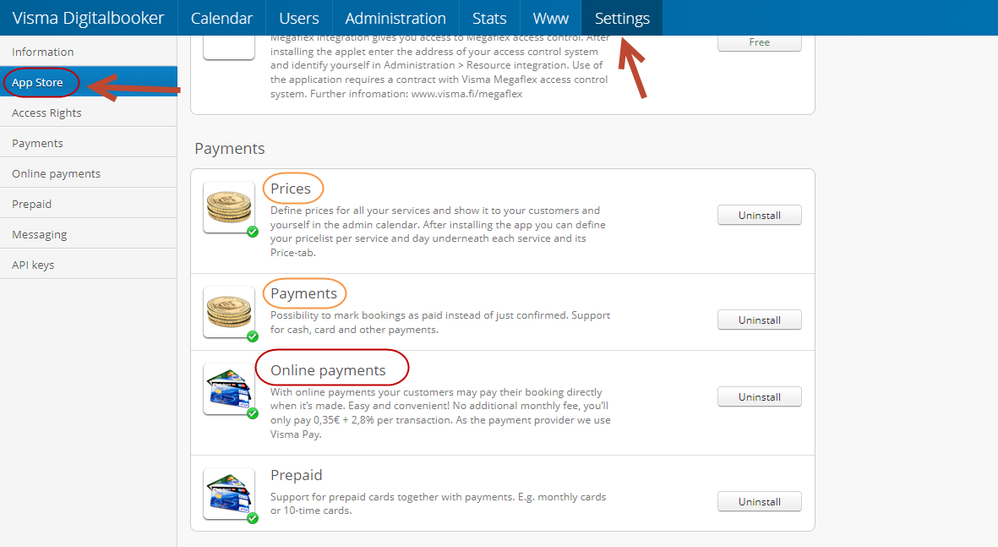
Go to Settings -> App Store -> Payments. Enable Online Payments, Prices, and Payments.
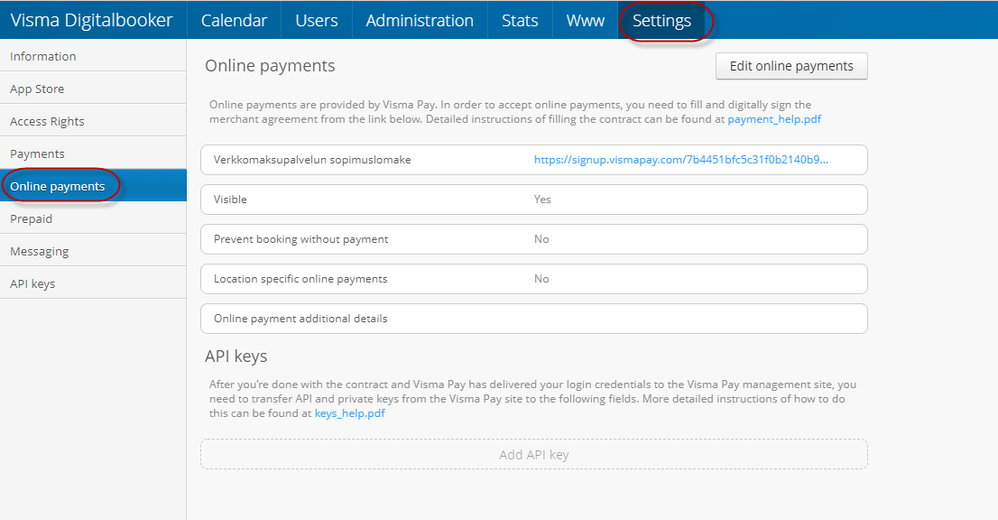
Once the online payment service agreement form has been filled in, you will receive Visma Pay's merchant portal IDs at the email address provided. There you can manage payments and settlements.
1. Log in to the Merchant Portal at vismapay.com.
2. Go to the Sub-Mechants-tab. Here you will find the Merchant ID and private keys.
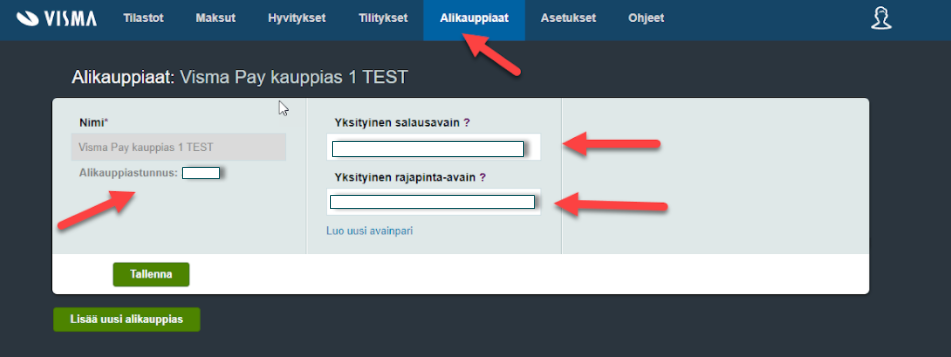
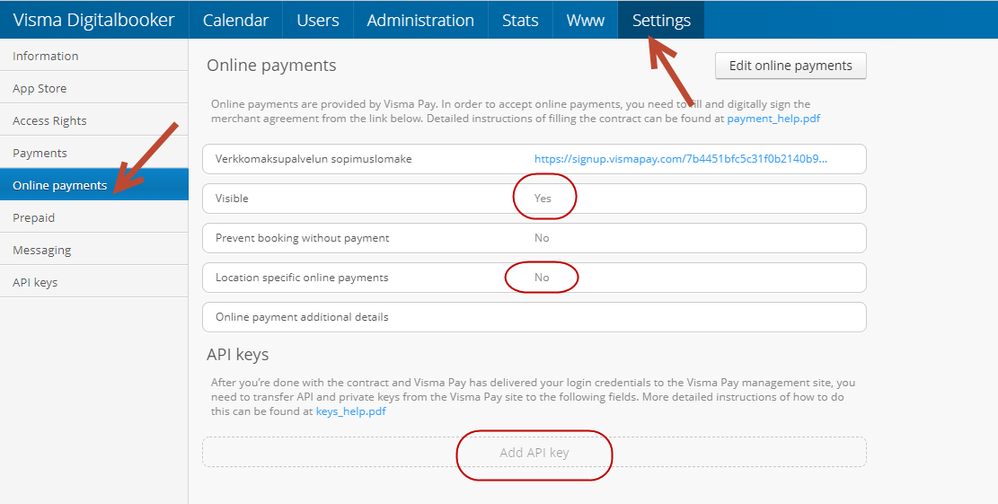
3. Enter the keys into the Digitalbook under Settings -> Online Payments -> API Keys.
Make payments visible in Settings -> Online Payments -> Visible: Yes.
Set up charges per location, and make sure the services you book are priced.
Oliko tästä vastauksesta apua? Kyllä Ei
Send feedback